Guide · Google Analytics 4
How to Track AI Traffic in GA4
See the visits ChatGPT, Perplexity, Gemini, Copilot and Claude send you, in one GA4 channel. Four steps, about ten minutes, and a regex you can copy and test on this page.
 By Raphaël Aubry, founder of Howseen AI · Published · Updated
 3-day free trial, cancel in 1 click. Trial: 3 days, plans from €39 per month. Cancel anytime from your settings.
In short
Can GA4 show traffic from ChatGPT and other AI assistants?
Yes. GA4 already files some AI visits under its AI Assistant channel; a custom channel with one regex on Session source groups every AI assistant that sends a referrer, including the ones Google's list misses.
Steps
4
in Admin, Data display
AI sources in the regex
11
hosts, plus 2 UTM values
Custom channel groups
2
per standard property
Role needed
Editor
or above on the property
- Built in: the AI Assistant channel of the default channel group (Google Analytics Help).
- Your own: a channel named AI, condition Source matches regex, placed above Referral.
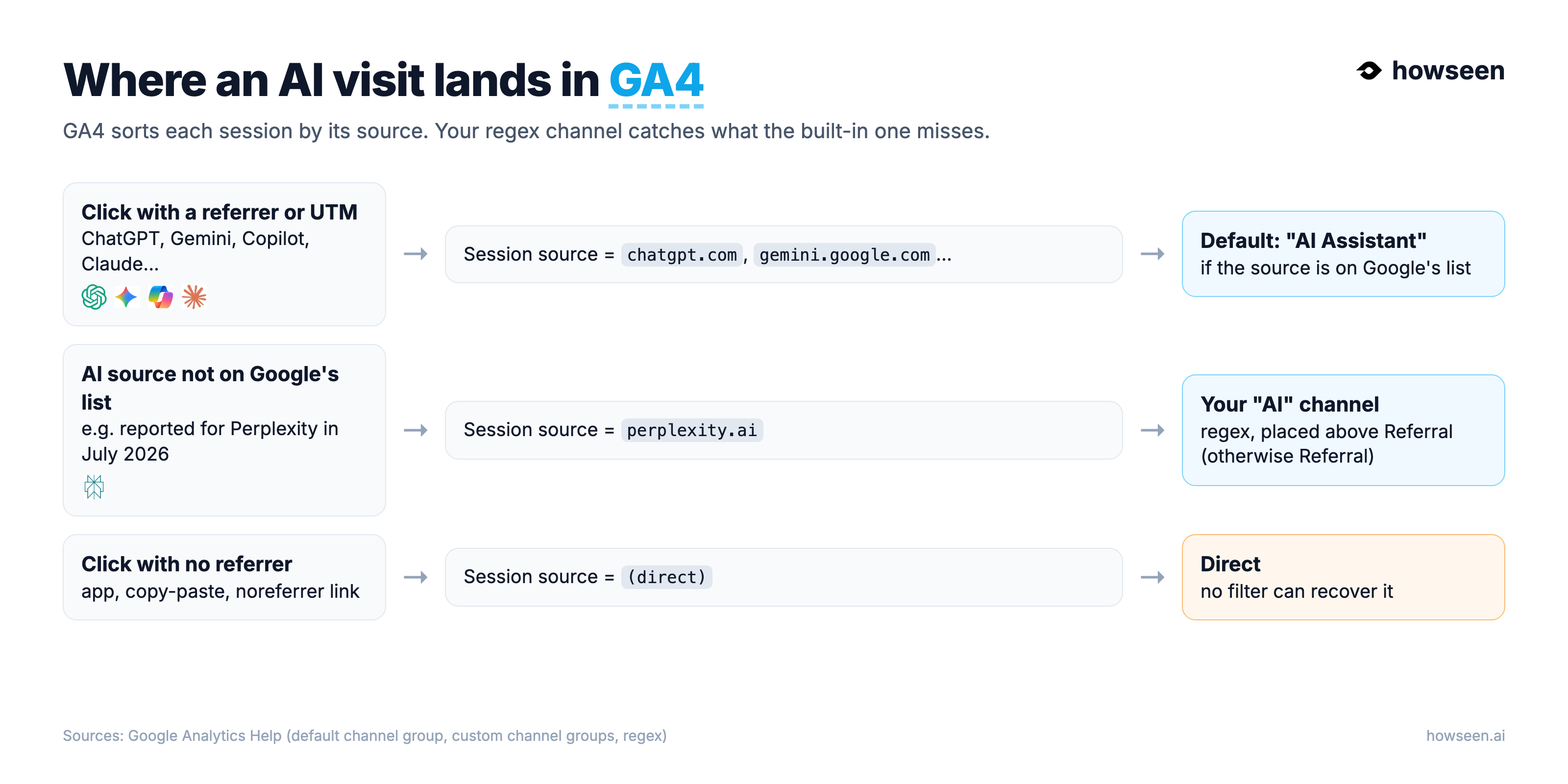
- Out of reach: AI visits that arrive without a referrer land in Direct, and clicks from Google AI Overviews or AI Mode count as organic search.
What GA4 does by default
What is the AI Assistant channel in GA4?
It is a default channel: when the referrer of a session is on Google's list of AI assistants, GA4 sets the medium to ai-assistant and reports the visit in the AI Assistant channel.
"AI Assistant is the channel by which users arrive at your site from sources like ChatGPT, Gemini, Deepseek, Copilot, or Grok. It excludes Google's AI Overviews and AI Mode."
Two limits matter. Google does not publish the list of assistants behind that channel, so you cannot check which sources it covers. And in July 2026, Search Engine Journal reported that Perplexity was not on it and still landed in Referral. If you want one line that you control, add your own channel.
Copy this
Which regex catches AI referrers in GA4?
Paste this value in a Source matches regex condition. It matches 11 AI assistant hosts with or without www, plus the UTM values chatgpt and perplexity, and nothing else.
GA4 uses full matching by default: without metacharacters a regex only returns values that match exactly, and matching is case sensitive (Google Analytics Help, regular expressions). This regex is written for that rule: www.perplexity.ai matches, thankyou.com or chatgptguide.com do not.
Test it on your own sources
Paste values from your Session source column, one per line. The check runs in your browser, nothing is sent.
Step by step
How do you create an AI channel in GA4?
Create a custom channel group, add a channel named AI with the regex on Source, move it above Referral, then pick the group as the primary dimension of the Traffic acquisition report.
- In Admin, under Data display, click Channel groups, then Create new channel group. GA4 starts from a copy of the default group. Name it, for example, Channels with AI.
- Click Add new channel, name it AI, click + Add condition group and choose Source, matches regex, then paste the regex above. Click Save channel.
- Click Reorder and drag AI above Referral (the top of the list is simplest), click Apply, then Save group. Order matters: "Traffic is included in the first channel whose definition it matches given the current order of channels in the group."
- Open Reports, Acquisition, Traffic acquisition and switch the primary dimension to your new channel group. Your AI line sits next to Organic Search, Direct and Referral.
These steps follow Google's guide to custom channel groups: you need the Editor role or above, a standard property can hold 2 custom groups (5 on Analytics 360), each with up to 50 channels, and Google notes that custom channel groups can be applied to your reports retroactively.
No settings change
How do you see which pages get AI traffic?
Build a free-form exploration with Session source and Landing page as dimensions, Sessions and Key events as metrics, and a filter on Session source with the same regex.
- Open Explore and start a Blank exploration.
- Import the dimensions Session source and Landing page + query string, and the metrics Sessions and Key events.
- Drag them into Rows and Values, then add a filter: Session source, matches regex, paste the regex. Explorations accept filters on dimensions and metrics (Google Analytics Help, segments and filters).
You now see which pages AI assistants send people to, and whether those visits convert. Those are the pages worth updating first.
Which questions make AI send you visits?
GA4 shows the visits. Howseen shows the buyer questions behind them, who AI names instead of you, and what to publish. 3-day free trial, cancel in 1 click.
Limits
Why will GA4 always undercount AI traffic?
GA4 can only read what the click carries. Visits without a referrer land in Direct, Google's own AI answers count as organic search, and many people read the answer without clicking at all.
- No referrer, no source. Apps, copy-pasted links and links opened with noreferrer arrive as
(direct). On October 14, 2026, Search Engine Roundtable reported ChatGPT links losing their UTM tag and referrer; the next day an analyst said tagging was back. OpenAI did not comment. - Google AI answers look like Google. AI Overviews and AI Mode are excluded from the AI Assistant channel (Google) and come in as organic search.
- Zero-click answers. When an AI summary appears, Google users click fewer links (Pew Research Center, July 2025). Being named in the answer matters even when no visit follows.
That is why visits are only half the picture. The other half is whether AI names you at all: research on generative engines shows that the way a page answers changes how often it is cited (Aggarwal et al., GEO, KDD 2024). Our own data on 359 brands shows how rare that still is: 85.5% were never named on their buyer questions.
With Howseen
How does Howseen read AI traffic from GA4?
Connect GA4 in Howseen and it reads your property with the same idea: sessions whose source is a known AI assistant, the revenue they bring, and the pages that capture them, next to your AI visibility.
The integration only reads your data; nothing changes in your tags. Visits from AI that arrive without a source are shown apart, as a labeled estimate, never as a measurement. See the GA4 integration, the Academy lesson Track your progress, and how to read AI visibility metrics. To check one question by hand first, try the free AI visibility checker.
FAQ
Questions, answered
Short answers to the questions we get most about this topic, with the same numbers and sources as the page above.
Does GA4 track ChatGPT traffic automatically?
Partly. Since 2026 the default channel group has an AI Assistant channel for visits whose referrer is on Google's list of AI assistants, such as ChatGPT, Gemini, Deepseek, Copilot or Grok. Google does not publish the full list, so a custom channel with the regex on this page is the safer way to see every AI source in one line.
Why does Perplexity traffic show as Referral?
In July 2026 Search Engine Journal reported that Perplexity was not on GA4's AI assistant list and still landed in Referral. A custom channel with Source matches regex, placed above Referral, moves it into your AI channel.
Are Google AI Overviews and AI Mode clicks counted as AI traffic?
No. Google states that the AI Assistant channel excludes AI Overviews and AI Mode. Those clicks arrive from Google and are counted as organic search, and GA4 cannot separate them from classic results.
Why do some AI visits show as Direct?
When a click carries no referrer and no UTM tag, GA4 has nothing to read and files it as Direct. That happens with some apps, copy-pasted links and links opened with noreferrer. No regex can recover those visits.
Does the custom channel change my past data?
Google says custom channel groups can be applied to your reports retroactively. You need the Editor role or above on the property, and a standard property can have 2 custom channel groups.
Related guides, data and next steps
3-day free trial, cancel in 1 click. Trial: 3 days, plans from €39 per month. Cancel anytime from your settings.